Accounts Receivable Process In SAP: A Complete Guide
Accounts receivable process in SAP is crucial for your financial record keeping. It helps most of the businesses to maintain their cash flow in correct order. The end-to-end AR process begins with the creation and maintenance of customer master data (general, company code, and sales area data) in transaction XD01/FD01.
Sales orders created in SD automatically generate billing documents (F1/F2 invoices) via VF01, which post accounting entries to FI-AR, debiting customers and crediting revenue.
Incoming payments are in record through F-28 (manual) or automatic payment programs, clearing open items and updating customer accounts.
Dunning programs (F150) automate overdue reminders, while credit management (FD32) controls customer credit limits. Standard reports like FBL5N (customer line items), aging reports, and the Accounts Receivable Information System provide real-time insights.
Table of Contents
- What Are Accounts Receivable?
- What Is The Working Mechanism Of Accounts Receivable Cycle Works On SAP?
- Explain Accounts Receivable Value Flow In SAP?
- Accounts Receivable Process Flowchart In SAP
- Accounts Receivable Steps & Process In SAP
- Accounts Receivable Business Process In SAP
- Critical Steps In SAP AR Business Process To Know
- SAP Accounts Receivable Document Types
- Common AR Document Types
- Distinction Between SAP FIORI & SAP FICO
- How Does SAP FICO Incorporate Cost Accounting?
- KPI Accounts Receivable In SAP
- FAQ(Frequently Asked Questions)
- Final Takeaway
What Are Accounts Receivable?
Accounts Receivable (AR) means the money a company owes to its customers for goods or services delivered but not yet paid. These are short-term amounts, typically due within 30 to 90 days, recorded as current assets on the balance sheet. AR arises when a business extends credit to customers, allowing payment after delivery. Application of Accounts Receivable process in SAP can assist you in meeting your goals with ease.
In practice, AR involves invoicing customers, tracking payments, and managing overdue accounts. It’s a key component of the order-to-cash cycle, impacting cash flow and financial health. Businesses use AR aging reports to monitor payment timelines and dunning processes to chase late payments. Effective AR management ensures timely collections, reduces bad debts, and maintains liquidity.

What Is The Working Mechanism Of Accounts Receivable Cycle Works On SAP?
The complete Order-to-Cash (O2C) cycle that feeds Accounts Receivable in SAP (ECC or S/4HANA) works as follows:
1. Customer Master Data Creation
Create/maintain customers using XD01 or FD01 (central data, company code, and sales area views). Credit limit and payment terms are here (FD32 for dynamic credit management).
2. Sales Order Creation
Sales order creation is done in an SD module with pricing, delivery, and payment terms. It is a crucial Accounts Receivable Process in SAP that you need to take care off.
3. Outbound Delivery & PGI
Goods are picked, packed, and the Post Goods Issue (PGI) is done → inventory reduced and Cost of Goods Sold posted. It is another crucial accounts receivable process in SAP that you should be well aware of.
4. Billing Document Creation
Invoice/F2 billing document generation from delivery/sales order → automatically releases accounting document to FI-AR:
Dr. Customer (Accounts Receivable)
Cr. Revenue + Tax
5. Accounts Receivable Posting
An open item is there in a customer account (visible in FBL5N). Reconciliation accounts (usually 130000) links subledger to G/L. Accounts receivable process in SAP can help you in meeting your goals with complete ease.
6. Incoming Payment Receipt
- Manual: F-28 (post incoming payment + clear open items)
- Automatic: F110 (payment program) or lockbox/Electronic Bank Statement (FF_5 / FEBA) Payment clears the invoice → customer open item status becomes “Cleared”.
7. Credit Management
If credit limit exceeds → sales order/delivery/billing gets blocked until released (VKM1/VKM4). However, you should maintain proper credit management tools to make things work well in your way. Accounts Receivable Process In SAP cannot ignore the process of proper credit management.
8. Dunning For Overdue Items
Automated overdue reminders sent according to the dunning procedure defined in customer master.
9. Account Analysis & Reporting
- FBL5N: Customer line item display
- FAGLL03 / S_AC0_52000887: G/L view
- FDI1 / FDI2: AR aging reports
- F.27: Periodic account statements
10. Period End Closing
- F.14 / F.07: Carry forward AR balances
- Bad debt provisions, forex revaluation (FAGL_FC_VAL), regrouping of receivables/payables.
Explain Accounts Receivable Value Flow In SAP?
Accounts Receivable (AR) refers to the amounts customers owe a business for products or services that have been provided but remain unpaid. Gaining a clear understanding of how values flow through the Accounts Receivable process in SAP is crucial for effective cash flow management, optimizing working capital, and ensuring accurate financial reporting. The following sections provide a detailed, structured overview of these AR value flows:
1. Customer Master Data Creation( F1 Customer Role)
- Process:
Prior to initiating any Accounts Receivable transactions, the customer master record must be created or modified in SAP through transaction codes such as XD01 (full customer creation including SD) or FD01 (FI-only customer creation). This record captures general information (such as name and address), company code-level settings (reconciliation account, payment terms, tolerance group), and, when applicable, sales area data for SD integration. Accounts receivable process in SAP is crucial for your brand development.
- Value Flow:
At this stage, no actual financial amounts are posted; however, the master data configuration lays the critical groundwork for all subsequent AR activities. In SAP S/4HANA, the customer is assigned the appropriate Business Partner role (e.g., “Customer” with FI role), which establishes the link between the subledger and the corresponding General Ledger reconciliation account.
- Example:
A new client named “Velotics” is set up with an approved credit limit of $50,000 and standard payment terms of net 30 days.
2. Credit Sale & Invoice Creation ( Lead To Cash Integration)
- Process:
The Order-to-Cash cycle begins in the Sales and Distribution (SD) module with the creation of a sales order via transaction VA01. This is followed by outbound delivery (VL01N/VL02N) and the generation of a billing document (customer invoice) using transaction VF01, which instantly triggers an automatic posting to the Accounts Receivable subledger in Financial Accounting (FI).
- Value Flow:
The billing document simultaneously increases the customer’s open-item balance in the AR subledger and posts the corresponding amount to the designated GL reconciliation account (typically an “Accounts Receivable – Trade” account). This transaction recognizes revenue in the profit and loss statement while recording a current asset (Accounts Receivable) on the balance sheet.
- SAP Specifics:
In SAP S/4HANA, seamless SD-FI integration ensures that the moment the billing document is released to accounting, a real-time accounting document is generated in the Universal Journal (ACDOCA). For instance, a Rs 10,000 invoice results in an immediate debit to the customer’s subledger account and a credit to the relevant revenue account(s) determined via account determination (VKOA).
- Example:
When Velotics is billed Rs 10,000 for a shipment of bicycles, the system automatically raises the customer’s Accounts Receivable balance by Rs 10,000 and recognizes Rs 10,000 in sales revenue.
3. Customer Payment Processing (Incoming Payments)
- Process:
Incoming customer payments are captured either manually through transaction F-28 (Post Incoming Payments) or via automated channels such as electronic bank statements, lockbox imports, or EDI payment files in SAP S/4HANA. Once posted, the payment automatically clears the corresponding open invoices and reduces the outstanding balance in the customer’s Accounts Receivable account.
- Value Flow:
The bank or cash account is debited to reflect the cash receipt, while the customer’s Accounts Receivable account is credited, eliminating or decreasing the open item. This transaction appears as a positive cash inflow under operating activities in the statement of cash flows. The structured Accounts Receivable process in SAP ensures that every value movement follows the correct sequence from invoice creation to final settlement.
- SAP Specifics:
SAP provides multiple posting methods: manual (F-28/F-26), semi-automated (lockbox program or FF_5 for EBS), and fully automated (EDI/IDoc or payment advice processing). The system intelligently matches incoming amounts to open items using reference numbers, amounts, dates, or assignment fields. For instance, a Rs 10,000 incoming payment is automatically offset against the matching Rs 10,000 invoice, bringing the customer’s open balance to zero.
4. Discounts & Payment Terms
- Process:
When a customer settles an invoice within the agreed early-payment discount window (for example, 2% reduction if paid within 10 days), the allowed cash discount is automatically or manually applied at the time of payment posting.
- Value Flow:
The customer’s Accounts Receivable balance is cleared in full for the original invoice amount, the bank account is increased only by the net amount received, and the difference is recognized either as a cash discount expense or as a reduction in revenue.
- SAP Specifics:
Early-payment terms (e.g., 2/10 net 30) are configured in the customer master record and inherited by the invoice. During payment entry in F-28 (or via automatic payment programs/lockbox), the system proposes or validates the eligible discount based on the payment date. For instance, a Rs 10,000 invoice settled early triggers a Rs 9,800 bank receipt and a Rs 200 posting to the cash discount granted account.
- Example:
Velotics remits Rs 9,800 within the 10-day discount period to settle a Rs 10,000 invoice, resulting in the system granting and posting a Rs 200 cash discount while fully clearing the receivable.
5. Dispute Management
- Process:
When a customer challenges an invoice—for instance, due to pricing inaccuracies—a dispute case is opened in SAP S/4HANA using Dispute Management (transaction UDM_DISPUTE or via Fiori apps). These cases are systematically monitored until resolution, which may result in issuing a credit memo, partial adjustment, or a write-off.
- Value Flow:
Upon resolution via credit memo, the customer’s Accounts Receivable balance is decreased, and a corresponding adjustment is made either to revenue or to a dedicated returns/allowances account. In the case of a write-off, the receivable is eliminated, and a bad-debt or doubtful-accounts expense is recognized.
- SAP Specifics:
Dispute Management is tightly integrated with Accounts Receivable, enabling users to generate dispute cases directly from open items in FBL5N or via automated workflows. For example, a Rs 1,000 disputed amount can be settled by releasing a Rs 1,000 credit memo (document type DG), which simultaneously reduces the AR balance and reverses the original revenue recognition.
- Example:
Velotics raises an objection to a Rs 1,000 billing line due to an incorrect unit price; after verification, a Rs 1,000 credit memo is posted, instantly lowering the outstanding receivable by the same amount.
6. Collections & Dunning
- Process:
SAP Collections Management uses intelligent, rule-based prioritization (often enhanced with AI) to identify overdue receivables and generate targeted worklists for collection specialists (transaction UDM_SPECIALIST). Simultaneously, the dunning program (transaction F150) automatically issues reminder notices or letters for past-due invoices.
- Value Flow:
No immediate financial posting occurs until the customer settles the amount; however, proactive dunning and collections activities shorten the collection cycle and lower Days Sales Outstanding (DSO). When configured, overdue interest can be calculated and added as an additional receivable.
- SAP Specifics:
Dunning procedures escalate communication intensity according to the number of days past due (e.g., friendly reminder → firm notice → legal warning), delivered via print, email, or workflow. For instance, a Rs 5,000 invoice that is 60 days overdue automatically triggers the appropriate dunning level, prompting the customer to pay.
- Example:
Velotics receives an automated dunning notice for a $5,000 invoice that is significantly overdue, which successfully drives the customer to remit payment shortly thereafter. This capability represents one of the most vital components of the end-to-end Accounts Receivable process in SAP.
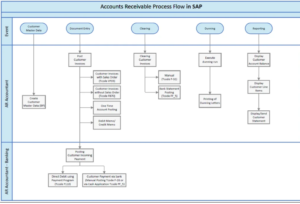
Accounts Receivable Process Flowchart In SAP
Few related topics for your knowledge
- SAP FICO Vs SAP HANA: Which Is Better
- Analyzing The Procure To Pay Process: A Comprehensive Overview
- How SAP FICO Works In Manufacturing Industry
- SAP FICO Transaction Codes: List Of T-Codes To Remember
- Why Smart Finance Pros Are Rushing To Learn SAP FICO
- 50+ SAP MM Interview Questions and Answers Revealed
Accounts Receivable Steps & Process In SAP
The Accounts Receivable process in SAP is the financial part of the Order-to-Cash (O2C) cycle. It begins when a customer places an order and ends only when the company receives full payment and all open items are cleared. Below is the complete, real-world sequence as implemented in SAP ECC and SAP S/4HANA.
1. Customer Master Data Set Up
Before any transaction, a customer record must exist. In S/4HANA, this is created as a Business Partner (transaction BP) with the role “FI Customer” and optionally “Customer” (for SD). In ECC, use XD01 (with SD) or FD01 (FI-only). Key fields include the reconciliation account (e.g., 130000 – Trade Receivables), payment terms (net 30, 2/10 net 30, etc.), credit limit, and tolerance group. No financial posting occurs at this stage, but this step is mandatory for all subsequent AR activity.
2. Sales Order Creation
The process starts in the Sales and Distribution (SD) module with transaction VA01. A sales order is created specifying material, quantity, pricing, and delivery date. SAP performs an automatic credit check (if configured). No FI posting yet.
3. Outbound Delivery & Picking
Using VL01N or VL02N, a delivery document is created, and goods are picked from the warehouse. Still no FI posting. Accounts Receivable Process in SAP can help you in making the correct outbound delivery.
4. Post Goods Issue
When goods leave the warehouse (VL02N → Post Goods Issue), inventory is reduced and Cost of Goods Sold (COGS) is recorded in Materials Management (MM). This step triggers the possibility of billing.
5. Customer Invoicing & Billing
Transaction VF01 (or collective run VF04) creates the billing document (usually type F2 – standard invoice). This is the most important step for AR:
- The moment the billing document is saved and released to accounting, SAP automatically creates an FI accounting document.
- Typical posting: Debit: Customer (Accounts Receivable subledger) Credit: Revenue account(s) Credit: Output tax (VAT/GST) if applicable
- In S/4HANA, everything is written instantly to the Universal Journal table ACDOCA.
6. Down Payment
Customer is asked to pay in advance.
- Step 1: Create down payment request (F-37).
- Step 2: Receive money (F-29) → Dr Bank, Cr Special G/L account (indicator “A”).
- When final invoice is created later, the down payment is automatically cleared against the invoice.
7. Incoming Customer Payment
When the customer pays, several options exist:
- Manual posting: F-28 (most commonly used)
- Automatic bank statement import: FF_5 or lockbox
- Automatic payment program or EDI Posting: Debit: Bank or Cash account Credit: Customer (clears the open invoice) The invoice status changes from “Open” to “Cleared” in the system.
8. Credit Memos
For returns, pricing corrections, or goodwill:
- SD route: VF01 with billing type RE → credit memo.
- FI route: FB75 Posting: Dr Revenue/Returns, Cr Customer → reduces AR balance.
9. Dispute Management
If a customer disputes an invoice, a dispute case is created (transaction UDM_DISPUTE in S/4HANA). The disputed amount is flagged, and resolution may lead to a credit memo or write-off.
Rule the Market with Professional SAP Training |
|||
| SAP Certification Courses | |||
| Explore All SAP Courses SAP FICO Course online | SAP MM Course Online | SAP PP Course Online | SAP SD Course Online |
|||
Accounts Receivable Business Process In SAP
The SAP Accounts Receivable (FI-AR) business process is the financial completion of the Order-to-Cash (O2C) cycle. It records money owed by customers, ensures timely collection, and accurately reflects receivables in financial statements. Below is the real-world, end-to-end business process as implemented in SAP ECC and SAP S/4HANA.
1. Pre-requisites & Master Data
- Customer Master Data
- Created as Business Partner (S/4HANA – transaction BP) or via XD01/FD01 (ECC).
- Critical fields:
- – Reconciliation account (e.g., 130100 – Trade Receivables – Domestic)
- – Payment terms (e.g., 0001 = payable immediately, 0012 = 2/10 net 30)
- – Credit limit & risk category (links to Credit Management)
- – Tolerance group, dunning procedure, house bank
- This determines how every future transaction will be posted.
2. Order Creation & Credit Check
- Sales order created (VA01).
- System performs automatic credit check (static or dynamic) using FD32 (ECC) or UKM_CASE (S/4HANA).
- If credit limit exceeded → order is blocked for delivery until released by credit team.
3. Delivery & Goods Issue
- Outbound delivery (VL01N/VL02N) → Post Goods Issue (PGI).
- Inventory reduced, COGS posted (MM-FI integration).
- Billing now becomes possible.
4. Customer Invoicing- The Birth Of Accounts Receivable
- Key moment for AR: Billing document created via VF01 (or collective VF04/VF06).
- Billing type F2 (standard invoice), F1 (delivery-related), etc.
- The instant the invoice is released to accounting: → Automatic FI document is generated (document type RV). → Posting: Dr. Customer (open item in subledger) Cr. Revenue accounts (determined via VKOA) Cr. Output tax (VAT/GST)
- In S/4HANA: Everything lands real-time in ACDOCA (Universal Journal).
5. Payment Receipt & Clearing
- Customer pays via bank transfer, check, card, etc.
- Recording options: – Manual: F-28 (most common), F-26 (fast entry) – Automatic: Electronic bank statement (FF_5), lockbox, EDI, payment advice
- Posting: Dr. Bank / Cash Cr. Customer → open item cleared
- Status changes from “Open” to “Cleared” (visible in FBL5N).
6. Special Payment Scenarios
- Early Payment Discount: If terms allow 2/10 net 30 and customer pays within 10 days → F-28 automatically proposes discount → Dr. Cash Discount Granted (expense).
- Partial / Residual Payments: Customer pays less → either partial payment (original invoice remains) or residual item (new open item created).
- Down Payments / Advances: F-29 → special G/L indicator “A” → cleared automatically when final invoice posted.
7. Adjustments & Corrections
- Credit Memos (returns, pricing errors, rebates): SD route: VF01 (type RE) → FI route: FB75 → Dr. Revenue/Sales Deductions, Cr. Customer
- Debit Memos (under-billing): Opposite posting.
8. Collections & Dunning
- Dunning (F150): Automated reminder letters/emails for overdue items. Levels escalate: Level 1 (friendly), Level 4 (legal action possible). Can add dunning interest → Dr. Customer, Cr. Interest Income.
- Collections Management (S/4HANA): Transaction UDM_SPECIALIST → AI-driven worklists, promise-to-pay tracking.
9. Dispute Management
- Customer disputes invoice → create dispute case (UDM_DISPUTE).
- Disputed amount flagged → resolution via credit memo, write-off, or escalation.
10. Bad Debts & Write off
- Uncollectible receivables → write-off via
- – Manual: F-30 with clearing
- – Automatic programs
Critical Steps In SAP AR Business Process To Know
The SAP Accounts Receivable (FI-AR) business process is the financial backbone of the entire Order-to-Cash (O2C) cycle. It begins the moment a customer is promised goods or services and ends only when cash is received, open items are cleared, and the books are reconciled. The process is the same in principle in SAP ECC and SAP S/4HANA, though S/4HANA delivers real-time postings, embedded analytics, and a simplified data model (Universal Journal – ACDOCA). Below are the key steps every organization using SAP follows, explained in practical, real-world detail.
1. Customer Master Data Creation & Maintenance
Everything starts here. No invoice can be posted without a valid customer master record.
- In SAP S/4HANA: Use transaction BP (Business Partner). One Business Partner can have multiple roles — “FI Customer” (for FI-AR) and “Customer” (for SD).
- In ECC: XD01 (creates customer with SD + FI views) or FD01 (FI-only). Key mandatory fields for AR:
- Reconciliation account (e.g., 130000 – Domestic Trade Receivables) – this is the GL account to which all customer postings summarize.
- Payment terms (e.g., 0001 = immediate, 0014 = 2/10 net 30).
- Credit control area & credit limit (links to credit management).
- Dunning procedure and dunning block.
- Tolerance group (defines acceptable under/over payment amounts). Without correct master data, invoices will fail to post or post to wrong accounts.
2. Sales Order Creation & Automatic Credit Check
Sales department creates the sales order using VA01.
At save, SAP automatically performs a credit check (if activated):
- Static check: Total receivables + order value vs credit limit.
- Dynamic check: Includes open orders and deliveries. If limit is exceeded → order is blocked for delivery (credit block). Credit team releases via VKM1 (ECC) or Fiori “Manage Credit Blocks” (S/4HANA). No FI posting occurs yet, but this step prevents creation of new receivables that are likely uncollectible.
3. Outbound Delivery & Post Goods Issue
Logistics creates delivery (VL01N/VL02N) → picks and packs → executes Post Goods Issue.
At PGI:
- Inventory is reduced.
- Cost of Goods Sold (COGS) is posted (MM-FI integration). This step makes the transaction billable.
4. Customer Invoice Creation – The Moment AR Is Born
This is the single most important step for Accounts Receivable.
Billing team runs VF01 (single) or VF04/VF06 (collective billing).
Common billing types:
- F2 = Standard customer invoice
- F1 = Delivery-related invoice Upon saving and releasing the billing document to accounting:
- SAP automatically creates an FI accounting document (document type RV).
- Posting: Dr. Customer (open item in subledger) Cr. Revenue account(s) – determined via account determination transaction VKOA Cr. Output tax (VAT/GST) if applicable In S/4HANA, the entry is written instantly to the Universal Journal (ACDOCA) – no more reconciliation between FI and CO. At this exact moment, Accounts Receivable increases on the balance sheet and revenue is recognized.
5. Down Payment / Advance Payment Handling
Many companies require partial or full payment before delivery.
- Create down payment request in SD (F-37).
- When customer pays: F-29 with special G/L indicator “A”. Posting: Dr. Bank | Cr. Customer Down Payment Clearing (special G/L account).
- When final invoice is later created, SAP automatically clears the down payment against the invoice.
6. Incoming Customer Payment & Open Item Handling
The core daily activity of any AR clerk.
Payment receipt options:
- Manual posting: F-28 (Post Incoming Payments) – most widely used.
- Fast entry: F-26.
- Automatic: Electronic bank statement (FF_5), lockbox, payment advice, EDI. Posting: Dr. Bank / Main Bank / Incoming Check account Cr. Customer → open invoice is cleared (status changes from Open → Cleared). The system matches using reference number, amount, document number, or assignment field.
7. Early Payments & Cash Discounts
If payment terms offer discount (e.g., 2/10 net 30), and customer pays within 10 days:
In F-28, SAP automatically calculates and proposes the discount based on payment date.
Example for Rs 10,000 invoice:
Customer pays Rs 9,800 on day 8 →
Bank A/c ——————————————- Dr Rs 9800
Cash Discount Granted A/c ——————- Dr Rs 200
To Customer A/c ——————————————Cr Rs 10,000
The discount is an expense (or revenue reduction depending on configuration).
SAP Accounts Receivable Document Types
Here are the key SAP Accounts Receivable (FI-AR) Document Types explained in clear text format (standard in SAP ECC and S/4HANA):
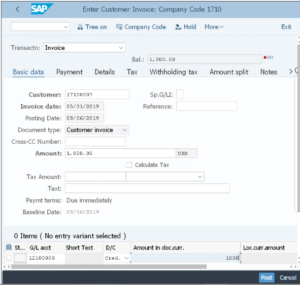
1. DR- Customer Invoice
This is the standard document type for posting normal invoices to customers. Used in transactions like FB70 (single-screen) or F-22 (classic). It posts a debit to the customer receivable account.
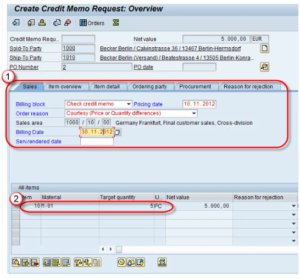
2. DG- Customer Credit Memo
Used when issuing a credit note to a customer (e.g., for returns, price corrections, discounts after invoicing). Posts a credit to the customer account. Transaction: FB75 or F-27.
3. DZ – Customer Payment
Standard document type for incoming payments from customers (cash, check, bank transfer, payment cards). Used in F-28 (manual incoming payment), F-32 (clear open items), or automatic payment programs. Posts a credit to the customer and debit to bank/cash.
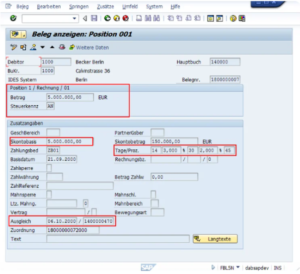
4. DA- Customer Debit Memo
Rarely used. Represents an additional debit to the customer (e.g., undercharged invoice correction). A DA document is used to charge a customer an additional amount after the original invoice has already been issued.
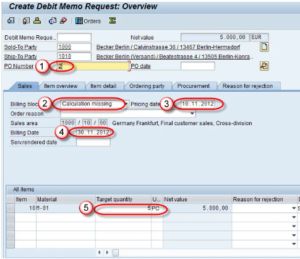
5. RV- Billing Document Transfer
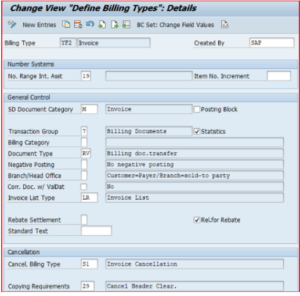
Automatically generated when an SD billing document (created via VF01/VF04) is released to accounting. This is how most customer invoices from Sales & Distribution reach FI. Usually uses external number range 01.
Common AR Document Types
- AB – General Accounting Document Used for various clearing, reversal, or year-end postings. Can appear in customer clearing if mixed with G/L items.
- KG – G/L Account Credit Memo Not purely AR, but sometimes appears when crediting a G/L account linked to customer items.
- KZ – Vendor Payment Appears in AR when clearing customer open items that are linked to vendor items (netting/intercompany).
- SA – G/L Account Document Standard G/L posting (FB50). May appear in customer documents if G/L lines are involved.
- SK – Cash Journal Document Used when posting via cash journal (not common for regular AR).
Distinction Between SAP FIORI & SAP FICO
There are several points of differences between SAP FIORI & SAP FICO that you must be well aware off. Some of the key points to remember here are as follows:-
| Aspect | SAP FIORI | SAP FICO |
|---|---|---|
| What It Is | User Interface (UI) – How you interact with SAP | Business Module – What SAP does for finance |
| Category | Front-end / Design / Apps | Back-end / Functionality / Processes |
| Focus | User experience, simplicity, mobility | Financial accounting and controlling |
| Examples | Fiori Launchpad, apps like “My Inbox” for approvals | Posting journals, running balance sheets, cost allocation |
| Dependancy | Can be used with any SAP module (including FICO) | Core SAP module; can be accessed via SAP GUI or Fiori |
| Access Method | Through Fiori Launchpad (browser/mobile) | Traditionally via SAP GUI (transaction codes like FB01), but now also via Fiori apps |
| Users | Everyone (business users, executives) | Finance professionals |
| Implementation | Configured via SAP Fiori apps library; needs activation | Configured via IMG (SPRO) paths for FI/CO settings |
| Relation | Fiori is the “face” – it can display FICO data in a simple way | FICO is the engine Processes the data that FIORI Shows. |
How Does SAP FICO Incorporate Cost Accounting?
Cost accounting is not performed in FI — it is 100% handled inside the CO (Controlling) module. FI only records the financial transaction, while CO answers the questions “Where did the cost go?”, “Why was it incurred?”, and “Which product/customer caused it?”.
1. Cost Element Accounting
Every P&L expense or revenue account in FI must have a corresponding cost element in CO.
- Primary cost elements = directly linked to a GL account (e.g., salary, electricity, material consumption).
- Secondary cost elements = used only inside CO for allocations (no FI posting, e.g., assessment cost elements). Without a cost element, you cannot post any cost in Controlling.
2. Cost Center Accounting
The foundation of overhead cost controlling.
- Costs are first posted to cost centers (e.g., Production Dept, Marketing, IT, Administration).
- You can plan costs per cost center, compare plan vs. actual, and run reports (e.g., S_ALR_87013611).
- Cost centers are organized in a hierarchy (standard hierarchy in OKKP).
3. Internal Orders
Used for short-term cost collection and monitoring.
Examples: trade fair, marketing campaign, plant maintenance order, small investment project.
Real orders (type 01) affect the P&L and can be settled; statistical orders (type 02) are only for reporting.
4. Activity-Based Costing
Overhead costs are allocated using activity types (e.g., machine hours, setup hours, number of purchase orders).
You define prices per activity (KP26) and the receiving object (production order, product) is charged based on confirmed quantities.
5. Product Cost Controlling
The heart of manufacturing cost accounting.
- Calculates standard cost of a finished product (CK11N) using BOM + routing + activity prices.
- Collects actual costs on production orders or process orders.
- Calculates variances (input price, quantity, resource usage, scrap, etc.).
- Releases standard price (CK40N) which becomes the inventory valuation price.
6. Material Ledger & Actual Costing
Instead of standard costing, you can revalue inventory and cost of goods sold at actual prices every month.
Very common in companies with volatile raw material prices (chemicals, metals, food).
7. Settlement & Allocation
Costs collected on cost centers, internal orders, or production orders are moved to the final cost object:
- Settlement of production orders → material (increases inventory value)
- Assessment/Distribution cycles (KSU5, KSV5) → move overhead from support cost centers to production cost centers
- Activity allocation (KB21N) → charge based on activity consumption
KPI Accounts Receivable In SAP
Here are the most important and universally used Accounts Receivable KPIs in SAP environments, explained one by one with their meaning, calculation logic, typical targets, and where you can find them in the system.
1. Day Sales Outstanding Or Day Receivable Outstanding
The single most important AR KPI worldwide. It tells you on average how many days it takes to collect money from customers after a sale.
Formula: (Average Accounts Receivable balance over the last 12 months × 365) ÷ Credit sales revenue in the last 12 months.
Good target: 30–45 days (varies by industry – retail is often <30, manufacturing 45–60, project business >90).
In SAP: Fiori app “Days Sales Outstanding – Overdue” (F2217) or classic reports FDI2/FDI0.
2. Average Days Delinquent Or Average Days Past Due
Measures how many days, on average, customers are late beyond their payment terms.
It shows the effectiveness of your collection team (DSO includes payment terms, ADD only measures delay).
Good target: less than 5–10 days.
In SAP: Fiori “Overdue Receivables” app (F2215).
3. Best Possible DSO
Theoretical minimum DSO if all customers paid exactly on the due date.
Formula: (Current receivables that are not yet due × 365) ÷ Credit sales last 12 months.
The gap between actual DSO and Best Possible DSO shows how much room for improvement exists.
4. Percentage Overdue Receivables
Total overdue amount divided by total receivables × 100.
Good target: below 10–15% of total AR.
In SAP: Same Overdue Receivables Fiori app or FBL5N with dynamic selections.
5. Aging Structure
- Shows receivables split into time buckets: 0–30 days, 31–60 days, 61–90 days, 91–180 days, >180 days overdue.
- Healthy target: more than 80% of receivables in the 0–30 days bucket and less than 5% over 90 days.
- In SAP: Fiori “A/R Aging Analysis” (F2216) or classic report S_ALR_87012178.
6. AR Turnover Ratio
- How many times per year the receivables balance is collected.
- Formula: Credit sales last 12 months ÷ Average receivables.
- Good target: 8–12 times per year (higher is better).
FAQ(Frequently Asked Questions)
1. What Is The Accounts Receivable FI- AR Module In SAP?
Accounts Receivable (FI-AR) is a sub-module in SAP Financial Accounting (FI) that manages customer transactions, including invoicing, credit memos, incoming payments, and open item tracking. It integrates tightly with Sales and Distribution (SD) for automatic invoice posting from sales orders and with the General Ledger (GL) for real-time updates. In SAP S/4HANA, it uses Business Partners for centralized customer master data.
2. How Are The Customer Master Data Created In SAP For Accounts Receivable?
Customer master data is created using transaction codes like BP (Business Partner in S/4HANA), XD01, or FD01. In S/4HANA, assign the “FI Customer” role to the Business Partner. Data includes general information (name, address), company code-specific details (reconciliation account, payment terms), and sales area data for SD integration.
3. How Are Customer Invoices Posted In The SAP AR Process?
Invoices are typically posted automatically from SD billing documents (VF01). For manual posting, use transaction FB70 (debit memo) or F-22. The posting creates open items on the customer account and updates the GL reconciliation account.
4. How Are The Incoming Payments Processed And Applied In SAP AR?
Incoming payments are posted using transaction F-28 (manual) or automated via bank statement imports/lockbox. Payments clear open invoices through automatic or manual matching, reducing the customer’s AR balance. Partial, residual, or full clearing options are available.
5. What Is The Dunning Process In SAP Accounts Receivable?
Dunning is an automated reminder process for overdue invoices. Configure dunning procedures (transaction FBMP), assign to customers, and run dunning (F150) to generate letters/notices at defined intervals based on overdue days and amounts. It helps manage collections efficiently.
Final Takeway
Hence, these are some of the crucial aspects of Accounts Receivable Process In SAP can make things work well in your way while meeting your goals with complete ease. Ensure that you know the facts well while meeting your goals with complete ease.
You can share your views and opinions in our comment box to meet your goals with complete ease. So, share your views on it while meeting your needs with ease.

- Power BI Course Online: The Skill That Turns Spreadsheets Into a Career - October 15, 2026
- Data Science Course with Placement: Is It Worth It or Just Marketing? - October 9, 2026
- What is ITC in GST: The Complete Guide You Need - September 26, 2026