



Certificate in Tally, Power BI, Advance Excel
The Certificate in Tally, Power BI & Advanced Excel is an integrated program focused on modernizing the way professionals handle financial data. By combining the core accounting power of Tally with the analytical capabilities of Advanced Excel and Power BI, this course transforms learners into data-driven decision-makers. You will move beyond simple bookkeeping to master dynamic reporting, automated dashboards, and real-time data analysis, ensuring you are prepared for the high-demand sectors of accounting and business analytics
Who Is This Course For?
This course is perfect for:
- Students & Graduates: Looking to add a professional edge to their academic degrees.
- Job Seekers: Aiming for roles in finance, auditing, or tax consultancy.
- Entrepreneurs: Who want to manage their own business accounts and ensure legal compliance.
- Freelancers: Offering bookkeeping and tax filing services to small businesses.
- Working Professionals: Seeking to upgrade their knowledge of the latest GST and Income Tax provisions.
Why should you Learn this course?
- Gain proficiency in three of the most essential tools in the corporate world: Tally for accounting, Excel for data management, and Power BI for visualization.
- Leverage consistent access to numerous weekly vacancies, connecting you with recruiters seeking skilled professionals in accounting and Excel.
- Learn through live sessions and real-world case studies designed by professionals with years of field experience.
- Benefit from a curriculum that is 90% practical, accessible from anywhere, and supported by instant doubt-clearing assistance.
Learning Outcomes
After completing this program, you will be able to:
- Manage Financial Ecosystems Maintain comprehensive accounts, prepare financial statements, and manage statutory compliance using Tally.
- Analyze Complex Data Utilize Advanced Excel functions to organize, automate, and interpret large datasets efficiently.
- Create Visual Dashboards Build interactive and dynamic business reports in Power BI to provide actionable insights for management.
- Bridge Accounting & Analytics Translate raw financial figures into visual stories that drive business growth and operational efficiency.
- Generate MIS Insights Design and deliver structured MIS reports to support strategic business decisions and track organizational performance.
Career Prospects
Graduating from this program prepares you for a variety of high-growth roles in the corporate and financial sectors, including:
- Accountant / Accounts Executive
- MIS Executive
- Financial Analyst
- Business Reporting Analyst
- Data Analyst (Finance)
Certification
Earn an Industry-Recognized Credential Upon the successful completion of your training and the final assessment, which evaluates both your practical software proficiency and theoretical understanding, you will be awarded the Certificate in Tally, Power BI & Advanced Excel from ICA Edu Skills. This certification validates your expertise in the intersection of accounting and business intelligence, serving as a powerful endorsement of your skills to employers nationwide. By the end of this course, you will possess a future-focused toolkit valued across diverse industries.
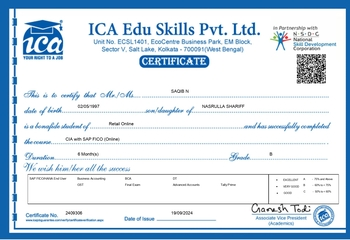
ICA + NSDC Certificate
Eligibility Criteria
-
Pre-Requisites for Joining this Course:
- Education:
- Completed Higher Secondary (Class 12)
- Pursuing Graduation to Complete or Completed
- Devices: Access to desktop or laptop with stable internet connection (as classes are practically oriented)
- CET: Must clear common entry test conducted by ICA
For more details - please connect with Career Coach at ICA Online
- Education:
- Tally
- Power BI
- Advance Excel
- AI in Accounting
- TallyPrime 51 Hours
- 1. Company creation
- 2. Cost Centre & Cost Category
- 3. Accounting
- 4. Inventory
- 5. Bill of Materials (BOM)
- 6. Basic concepts of GST
- 7. GST using Tally
- 8. Generation of Returns
- 9. TDS
- 10. PF
- 11. Backup and Restore
- 12. ESI
- 13. Payroll
- 14. Security Control
- 15. Reports
- 16. TallyPrime Intro
- 17. Download & Install
- 18. Process Flow
- 19. GoTo/SwitchTo
- 20. Charts of Accounts
- 21. Group & Subgroup
- 22. Ledgers (Creation, Alteration and Deletion)
- 23. Backup & Restore
- 24. Bill Allocation
- 25. Voucher Entry
- 26. BRS
- 27. Asset Purchase
- 28. Sale of Assets with Depreciation
- 29. Stock Group
- 30. Category
- 31. Godown
- 32. Stock Item
- 33. Stock Transfer
- 34. Purchase (Order , Receipt Note, Rejection Out, Invoice , Debit Note)
- 35. UOM
- 36. Purchase & Sale Cycle
- 37. Sales ( order , Delivery Note, Rejection In , Invoice , Credit Note )
- 38. Batch
- 39. Zero Values Entries
- 40. Actual Billed Quantity
- 41. Standard Price
- 42. Credit Limit
- 43. Appropriation of Expenses with Inventory
- 44. Reorder Level
- 45. Voucher Class
- 46. Interest Calculation
- 47. Non- Accounting Vouchers
- 48. Scenario Management
- 49. Budgeting & Control
- 50. Post Dated Cheque Management
- 51. Account Confirmation
- 52. Export & Import Data
- 53. Export B/s Reports in Excel and Other Formats
- 54. Security Control
- 55. Tally Audit
- 56. Split Company
- 57. Merge Company
- 58. Activating GST
- 59. Master Creation
- 60. Inward Supply of Goods – Local
- 61. Outward Supply of Goods - Local
- 62. Invoice Printing
- 63. Inward Supply of Goods – Interstate
- 64. Outward Supply of Goods – Interstate
- 65. Debit & Credit Notes
- 66. Different Rate - One Invoice
- 67. Input Tax Credit
- 68. Payment of Tax
- 69. Generate Return
- 70. Reconcile Status
- 71. Purchase Capital Goods
- 72. Goods & Services in same invoice
- 73. Discount on Sales Invoice
- 74. RCM
- 75. GST Reports
- 76. Deducting TDS on Expenses
- 77. TDS Payment & Challan
- 78. Challan Reconciliation
- 79. Form 26Q
- 80. Exporting Form 26Q
- 81. Rent (TDS & GST)
- 82. TDS Payment with Interest
- 83. No Deduction (15G & 15H)
- 84. Deduction at Lower Rate (Form 13)
- 85. Project on TallyPrime
- Advanced MS Excel 18 Hours
- 1. Advance Number Formatting
- 2. Advanced Conditional Formatting
- 3. Match & Index
- 4. Financial Functions
- 5. Power Query
- 6. Macro
- 7. Project
- 8. Array Formulas
- 9. PowerPivot & Power Map
- 10. Dashboard
- 11. G-suite
- Power BI 14 Hours
- 1. Introduction
- 2. Prepare Data in Power BI
- 3. Publish Power BI
- 4. Service Power BI
- 5. Desktop Tooltip Reports & Slicers in Power BI
- 6. Buttons & Bookmarks in Power BI
- AI in Accounting (Recorded Classes Only) 15 hours
- 1. Introduction to Artificial Intelligence (AI)
- 2. Artificial Intelligence (AI) in Taxation
- 3. Artificial Intelligence (AI) for Excel Integration
- 4. Artificial Intelligence (AI) in Tally ERP
- 5. Artificial Intelligence (AI) in Accounts and Finance


Get The Best E-learning Experience with ICA!




Still Thinking? Seats Are Filling Fast!

You’ve seen the opportunity, now grab it! Get job-ready skills with ICA’s expert-led, practical training — anytime, anywhere..